
Go to Windows platform Display platforms icon
Go to Windows platform Go to Mac platform Go to Android platform Go to iOS platform
Hasleo Backup Suite Free icon

Hasleo Backup Suite Free

5.8.2.2
5 1 reviews
10.1 k downloads
security security

Create backups of Windows and entire drives

Advertisement
Remove ads and more with Turbo
Advertisement
Remove ads and more with Turbo
Alberto García icon
Reviewed by
Alberto García
Developer’s Operations and Support
Alberto García is part of Uptodown's in-house Editorial Team. Translated by Uptodown Localization Team

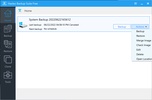
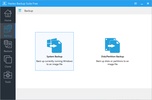
Hasleo Backup Suite Free is a tool for creating Windows backups as well as restoring them. All the backups you make are saved in DBI format and contain the entirety of the drive you have selected. Thanks to this, you can quickly and easily restore a Windows backup.

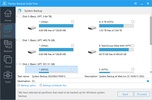
In addition to being able to back up entire drives, you can also clone them. With this option, you can quickly replicate the contents of one drive to another, whether it's the drive containing Windows or a different one. If the size is larger on the destination drive, you'll lose that extra capacity at first, but you can later recover and relocate it from the Windows disk management tool.

Advertisement
Remove ads and more with Turbo

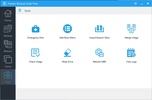
In addition to backing up, restoring, and cloning drives, from the tools section, you can also create an emergency drive, add a boot menu, import and export tasks, merge images, check images, erase drives, or rebuild MBR.

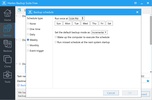
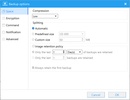
Hasleo Backup Suite Free is completely free, so you don't need a license in order to create a backup. With Hasleo Backup Suite Free, you can also schedule automatic backups on a daily, weekly, or monthly basis, or when a specific event occurs, such as every time the system boots up, shuts down, or when a device is inserted via USB. You can choose the incremental mode, which adds new files to the existing backup, or simply replace the entire backup.

Information about Hasleo Backup Suite Free 5.8.2.2

Basic information

Developer Hasleo Software
Category Backup
Rating All ages
Languages English
1 more

Distribution model

Pricing Free
License Proprietary
Copyright © 2026 Hasleo Software
Why is this app published on Uptodown? (More information)

Security and privacy

Required permissions Not applicable
See security and antivirus report

Download info

Downloads 10,057
Date Jun 28, 2026
File type EXE
Size 39.74 MB
SHA256 0b2e927a076b60c5101535f9622e3b309d1935ed7eee105f8618706fc483319b
Advertisement
Remove ads and more with Turbo

Older versions

See more
exe 5.8.2.1 May 21, 2026
exe 5.8.2.0 Apr 28, 2026
exe 5.6.2.1 Apr 7, 2026
exe 5.6.2.0 Jan 28, 2026
exe 5.6.2.0 Jan 26, 2026
exe 5.5.2.2 Dec 5, 2025

Rate this App

Review the app
Hasleo Backup Suite Free icon

Rating

5.0
5
4
3
2
1
1 reviews

Comments

There are no opinions about Hasleo Backup Suite Free yet. Be the first! Comment

Advertisement
Remove ads and more with Turbo
Samsung Smart Switch icon
Transfer the entire contents of your Samsung
EaseUS Disk Copy icon
Clone any hard drive or USB flash drive
AOMEI Backupper icon
Back up, restore and clone your Windows installation
SyncBackFree icon
Back up your files
SyncBreeze icon
Flexense Ltd
PowerISO icon
Burn, edit, merge and read disc images
Iperius Backup icon
Make and check up on incremental backups
EaseUS Todo Backup Free icon
Back up your photos and important documents
1.1.1.1 + WARP icon
Protect your Internet connection with the most secure option
EaseUS Data Recovery Wizard Free icon
Recover lost documents on your computer
X-VPN icon
Browse the internet safely and anonymously
Disk Drill icon
Recover your deleted files from any memory
Samsung Smart Switch icon
Transfer the entire contents of your Samsung
EaseUS Disk Copy icon
Clone any hard drive or USB flash drive
AOMEI Backupper icon
Back up, restore and clone your Windows installation
Recoverit Free icon
Restore any deleted file